
Click here to return to the main menu of the "Student Guides" section.
On this page, you will learn how to:
-
resolve log-in error, and
- log out.
Or you may simply click on any of the listed items above to skip to your desired help topic.
A) How to log in
-
Open your web browser and go to lms.kwasu.edu.ng.
-
Your username is Your Matric. No.
-
Your password is Your Surname
(Typed in lowercase letters) -
Click Log in.
(Then see Steps 5 and 6 below for the possible feedback that you might get).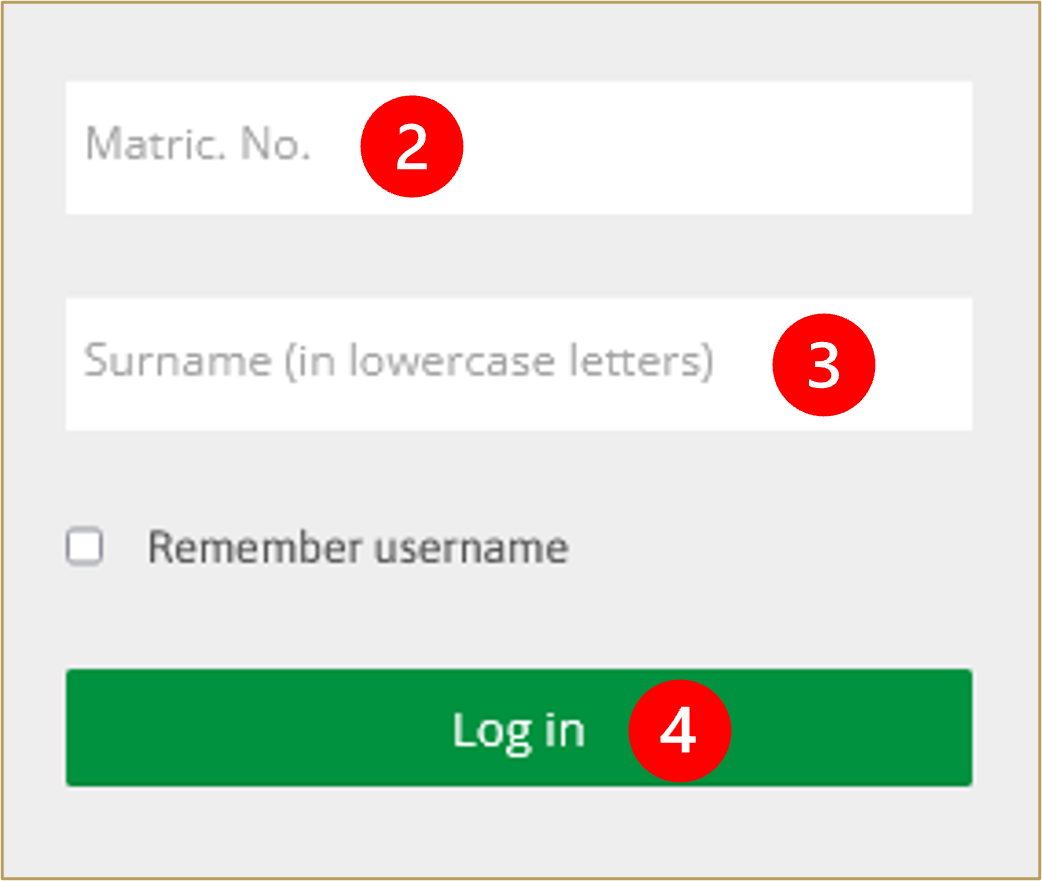
-
If successful, you will be redirected to the LMS homepage and you will see your name at the top of the screen.
-
If unsuccessful, you will receive an error message
(see Steps 7 to 11 below to learn how to resolve this issue).
B) How to resolve log-in error
(You may also download these resolution steps as a PDF file or watch them as a video tutorial).
If you are unable to log in, do not attempt to reset your password (this feature is not available to students).
Rather, try each of the steps in this checklist (Steps 7 to 11), one after the other:
-
Make sure that you already have an active user profile on KWASU-Virtual
(Click here to learn how to create a user profile via LMS Enrolment). -
Be sure to type-in your Matric. No. and surname correctly while attempting to log in
- retry steps 1 to 4 using lowercase letters. -
Perhaps you mistakenly added a "blank space" after your surname while applying for admission
- try adding a blank space after your surname as your LMS password. -
Perhaps your surname contains a special character like a dash ( – ) or an apostrophe ( ' )
- try this also. -
instead of your surname, try using your first name or middle name (in lowercase) as your password.
C) How to log out
-
Click on your name at the top of the screen to reveal your user menu.
-
Click Log out.
Click here to return to the main menu of the "Student Guides" section.